

Search
User login
Topic “Individual”
Contains activities for individuals (one on one).
Communicating Phonics - Quick Reference
 various contributors
Created 13 June 2012; updated 6 December 2024.
Initiate a request for items to do a task
| Activity/strategy name and materials required | How to do the activity | Key principles for doing the activity and comments |
|---|---|---|
| Impossible task! Materials as needed, for example:
| Ask the child to carry out tasks without giving them the equipment they need. For example:
| If a child does not request anything, you can try to motivate the child to correct you or "help you", for example:
See also suggestions here: make a choice at snack time |
use switches to turn something on or off
| Activity/strategy name and materials required | How to do the activity | Key principles for doing the activity and comments |
|---|---|---|
| Keeping cool: learning to sustain an action Fan, (with optional ribbons attached) Mains switch control box | Configure the controller so that the fan is on as long as the switch is held down. Hold down the switch and let the child/adult feel the breeze. Let them do the same. | The child/adult should experience holding down the switch and feeling the breeze. On release the breeze stops. State, "On" and "Off" as you and the child/adult press and release the switch. |
| Learning to use a switch to turn a device on Fan (as above) | As either of you press the switch say, "on." When it stops say "off." Show them the effect of the breeze, blowing your hair or rubbing your arms because it is cold. | |
| Switching a device on and off (Do this in a subsequent session after the child/adult has understood the process in the above activity). A device to control, for example: fan toy computer monitor bubble machine | Let the child/adult turn the fan on and off modelling the vocabulary as you go. Reinforce this learning with different devices at different times and places. |
Make a choice using two switches
| Activity/strategy name and materials required | How to do the activity | Key principles for doing the activity and comments |
|---|---|---|
| Establishing motivators Items/activities the student may be interested in. Items/short activities the student is not interested in. |
| Don't use two things which are motivating for the student as you won't be able to tell whether they've succeeded in expressing a choice or not. |
| Establishing the switches to use Appropriate switches to use Typically you might start off with a couple of large recordable buttons (for example "Big Macs". You may have already established this with single switch work and established that they can make something happen with a single switch). | You may need to work with an occupational therapist to establish what type of switch a student can use - particularly if they have complex physical difficulties. | |
| Making choices Pair of switches Motivating and un-motivating items/activities (see the activity "establishing motivators" above) | If they don't press a switch you may need to:
Consistency of pressing Do they appear to be pressing one switch more than another, or do they appear to be choosing the switch randomly? Swapping the switches around from time to time will help you to know this. If they aren't consistent, you could try making the switches more different, for example:
You could also try:
|
Developing attention and listening skills through motivating activities
| Activity/strategy name and materials required | How to do the activity | Key principles for doing the activity and comments |
|---|---|---|
| Sensory Play - Sensory toys and materials for messy play (e.g. trays with sand/ cornflour and water/jelly). - The best toys are those that the child can manipulate easily to produce a result. | 1. Guide your child's hands and visual attention to toys/trays of material(s) that they can touch and look at. 2. Let your child explore the toys/materials in the tray and encourage them to investigate all their properties, stimulating all of the child's senses as far as possible (colour, smell, texture). 3. You may need to draw the child's attention back to the activity if the child becomes distracted. Use your voice to regain their attention (e.g. a drawn out "ohhhh!", or an intake of breath). | Do not continue with something the child has lost interest in, but wait a while before introducing another object. |
| Turn taking games - Ball / dark cloth - Your voice - to sing simple nursery rhymes that have an element of anticipation built in such as "Round and round the haystack, like a little mouse, one step, two step and into his little house". | This is a fun activity for you and the child to enjoy together. Use plenty of facial expression and your voice to gain and keep the child's attention. |
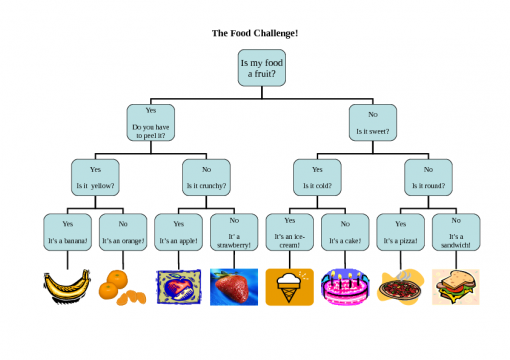
The Animal Challenge
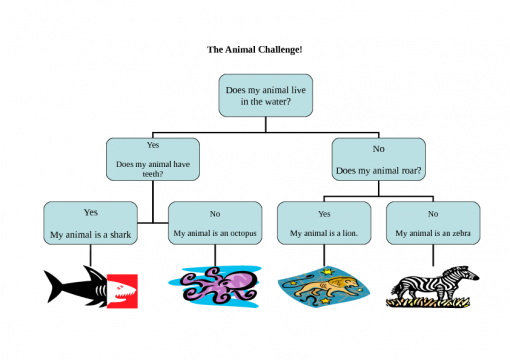
Flowchart of questions to identify an animal.
Created 15 May 2012; updated 18 July 2015.
Blank 3 question challenge
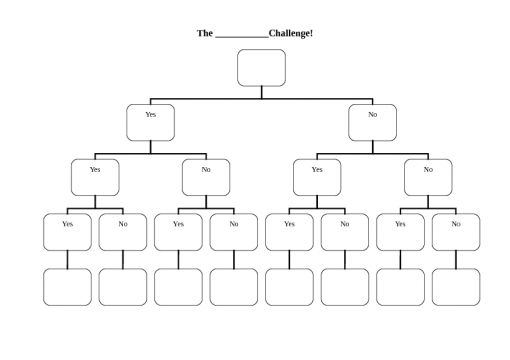
Template for creating questions using a flowchart: see https://en.commtap.org/language-communication/develop-question-skills for ideas as to how you could use this.
Created 15 May 2012; updated 16 July 2015.
Harder listening games
| Activity name and materials required |

Word Web Resources
Resources on this site for using word webs:

Coloured symbols for work and reward
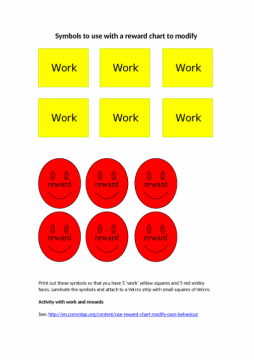


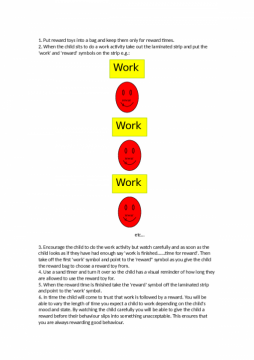
Created 23 April 2012; updated 16 July 2015.
Smiley face group progress sheet
Neil Thompson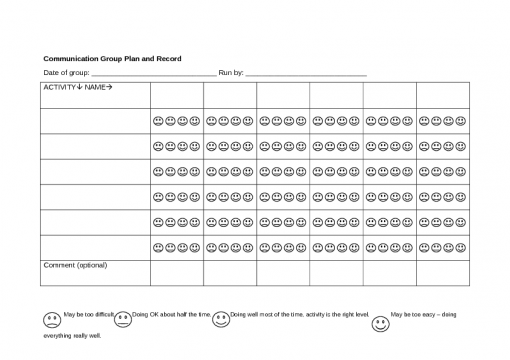
Quick therapy/lesson evaluation sheet - using a rating scale of four smiley faces.
The idea is for the child/person to evaluate themselves in terms of how well they were able to do the activity. This helps the person running the activity to select harder or easier activities as time progresses - keeping them at a level where there is generally a high degree of success.
Created 16 February 2012; updated 16 July 2015.
Auditory discrimination of minimal pairs
| Activity/strategy name and materials required | How to do the activity | Key principles for doing the activity and comments |
|---|---|---|
| Main instructions Pictures of minimal pair words (e.g. key/tea) - photocopy them on to card (e.g. 6 of each word) so that you can't see through the card. | 1. Put one of each picture (e.g. key and tea) on the table, face up. 2. Mix up the rest of the pictures and put them in a pile face down. 3. Take one picture from the pile, don't let the person see it! 4. Say what is on the picture (e.g. key). 5. Make sure you present the pictures in a random order so that the person can't predict what's coming next. 6. The person has to find the appropriate picture on the table. | These are the main instructions for the activities. Use this with the games below. |
| Lotto game Lotto boards (4 pictures to a board. Use pairs of words from the list above, but do not put both words of a pair on the same board) Corresponding picture cards |
Support Commtap to keep it online
Thank you for visiting Commtap.
Please read this message as it is extremely important.
- Visitor donations mean we can continue to host over 1,000 free activities to support speech, language, and communication development.
- Visitor donations mean we can continue to provide free resources to address a wide range of communication needs, including limited speech or language, interaction challenges, and needs associated with conditions such as developmental language disorder, autism, and cerebral palsy.
- Visitor donations mean we can continue to provide resources to support the work of speech and language therapists, teachers, teaching assistants, parents, and carers.
- Visitor donations mean we can continue to provide the free key word sign dictionary (bks.org.uk) which has over 2,000 Makaton and Signalong signs.
We know that not everyone is able to afford to pay to access these resources, however, if you can, please make a donation to keep the site going.
Thank you

Google ads on this page are provided by Google Adsense - and their presence does not imply any endorsement by Commtap. Report a problem with an ad on this page. Log in (for free) to avoid seeing Google ads.
